 Fleasionproxy
What Is Fleasion, and How Does It Work?
We built Fleasion to do one thing really well: change how your Roblox looks and sounds, live, without cheating and without touching anyone else's game. It's a free, open-source app for Windows, macOS and Linux that intercepts the assets Roblox downloads — textures, sounds, meshes, animations — and hands back yours instead, before the game ever sees the originals.
If you've watched a montage with custom gun sounds, a custom sky, or a glowing custom skin and wondered how someone did that, this is usually the answer. So here's the full picture from our side: what Fleasion is, how the "intercept → swap → deliver" pipeline we wrote actually works, everything you can change with it, and the games we support out of the box.
What is Fleasion?
Fleasion is a desktop app that lives quietly in your system tray. While you play, it can replace or remove the assets Roblox pulls down — a weapon's fire sound, a scope reticle, a skybox, a skin — with the ones you picked.
Three things define what we made:
- It's a local asset proxy, not a mod menu or an exploit. We don't touch game code or memory; we intercept asset downloads and substitute them.
- It's client-side and cosmetic. Your changes exist only on your screen. Other players — and Roblox's servers — see nothing different.
- It's free and open-source. We licensed Fleasion under GPL-3.0. It's written mostly in Python with a PyQt6 interface, and the whole codebase is on GitHub. The current release is v2.4.0.
The Replacer is designed for cosmetic swaps of existing assets. v2.4.0 also includes custom FastFlags and live proxy inspection, so the low-risk description of a sound or texture swap must not be stretched over every advanced feature. We separate those risks on the safety page.
Fleasion at a glance
The whole thing in numbers:
| Asset types it can touch | 80+ |
| What it can do with each | 4 ways — replace, remove, redirect, cache |
| Dashboard tabs | 7 — Replacer, Scraper, Proxy, Modifications, Subplace Joiner, Miscellaneous, Settings |
| Games with built-in presets | 6 — plus any Roblox game via the scraper |
| Desktop platforms | 3 — Windows, macOS, Linux (Sober) |
| Default routing | Env Proxy — scoped to Roblox Player or Sober; Studio is untouched |
| Where it runs | a loopback proxy, normally 127.0.0.1:58443 |
| License · cost · version | GPL-3.0 · free · currently v2.4.0 |
Every one of those numbers happens on your machine — nothing here touches Roblox's servers or another player.
How Fleasion works: intercept → swap → deliver
The entire product is one idea we liked: get in between Roblox and its content servers, and change the content mid-flight. Here's the pipeline we built.
1. Fleasion runs a proxy on a loopback port
In v2.4.0, Fleasion starts its HTTPS proxy on a high localhost port — normally 127.0.0.1:58443, with a free-port fallback on Windows. That local listener is the middleman for the Roblox Player session Fleasion starts.
2. Env Proxy relaunches Roblox through that listener
The default Env Proxy mode relaunches Roblox Player, or Sober on Linux, with proxy environment variables. It does not edit the system hosts file or need privileged port 443, and it leaves Roblox Studio alone. Fleasion still patches the certificate generated for the local proxy into Roblox's own trust bundle (ssl/cacert.pem) so TLS succeeds. Hosts File remains an optional legacy compatibility route.
The packed Python build and certificate patch can still trigger antivirus heuristics. We explain the boundaries on the safety page, and the routing change in the v2.4.0 update.
3. We decide what to do with each asset
Once Roblox requests an asset, Fleasion does one of four things, based on the rules you set:
- Replace it with another asset (a different texture, sound, mesh, and so on)
- Remove it from the request entirely (no arms, no textures)
- Redirect it to your own content from a URL or a local file
- Cache the original so you can browse, preview and export it later
The game then gets your version over the same session. That's the whole loop, running in real time for every asset.
One thing worth knowing up front: after you change a rule, Roblox has to re-download the asset through the proxy. So changes only apply once you clear the Roblox cache or restart Roblox — which is exactly why we added a "Clear Cache on Launch" option to do it for you.
What can you customize?
We support every asset type Roblox uses — 80-plus of them. In practice that's just about anything cosmetic or audio:
| Category | Examples |
|---|---|
| Audio | Gun sounds, reload/foley, hit markers, kill-confirm cues |
| Textures & decals | Skins, weapon textures, sleeves, UI images |
| 3D & world | Meshes, skyboxes, accessories |
| Avatar | Shirts, pants, hats, faces, accessories |
| Animations | R15/R6 rig animations |
The one rule we never bend: Fleasion can replace or remove these, but it can't create something the game doesn't have. It's a substitution engine, not an item generator.
Which games does Fleasion support?
You can customize any Roblox experience in general, but we ship curated presets for six titles so you don't have to hunt asset IDs yourself:
| Game | What people customize |
|---|---|
| Phantom Forces | Sights (red dot → delta), sleeves/arms, gun sounds, skyboxes, hit/kill sounds, Kousaku crosshair |
| Rivals | Custom skyboxes, hit sounds, gun sounds, no arms, skins |
| Da Hood | Skyboxes, gun sounds, hitmarker & eating sounds, avatar tweaks |
| AR2 | Sights, weapon/hit sounds, skins, texture removal |
| FJTR | Finish tweaks, transition polish, HUD cleanup |
| Roblox (general) | Avatar tweaks, custom textures, performance presets, minimal UI |
Each game has its own deep guide — for example, Fleasion for Phantom Forces — with real asset IDs and recipes.
Those six just ship with presets. Because we work at the proxy level, Fleasion isn't limited to them — it works with any Roblox game, and the community has configs for plenty more (Counter Blox, Arsenal, Apocalypse Rising, The Armory and others). See what games Fleasion supports, where we also tallied which games people actually customize most.
What's inside the app
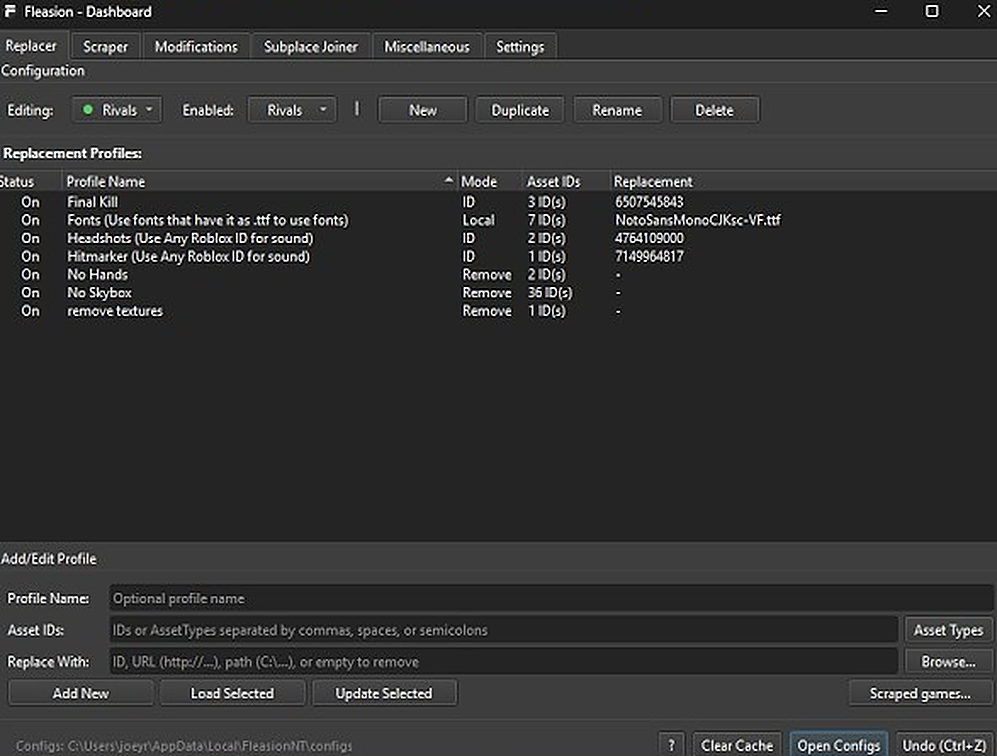
Right-click the tray icon, hit Dashboard, and you're in the interface we built. This is where the power lives.
The seven tabs
- Replacer — where you build replacement profiles: an Asset ID to change, and what to replace it with (an ID, a URL, or a local file). Profiles flip on and off individually.
- Scraper — our live cache scraper (below).
- Proxy — inspect, filter, hold, edit, replay, forward or drop live proxy traffic. Never stream this tab: it can expose login data.
- Modifications — performance and FastFlags (rendering mode, MSAA, texture quality, frame-rate cap, "gray sky") for players chasing max FPS.
- Subplace Joiner — join specific sub-places and run multiple Roblox clients at once.
- Miscellaneous — account manager, reserved servers, and utilities.
- Settings — theme, run on boot, "Clear Cache on Launch," "Auto Delete Cache on Exit," and more.
The cache scraper
Turn the scraper on and Fleasion captures every asset Roblox downloads while you play, automatically. We built it in two stages: it first reads the batch requests (assetdelivery.roblox.com/v1/assets/batch) to learn each asset's ID, type and CDN location, then captures the real download from fts.rbxcdn.com. It even converts formats on the fly — KTX textures to PNGs, texture packs resolved, meshes to and from .obj. That's how you find the exact IDs you want to swap.
The built-in viewers
Since the scraper grabs real assets, we added previewers so you can inspect them first:
- Mesh Viewer — OpenGL 3D preview with orbit/FPS camera and wireframe
- Animation Viewer — live playback on R15/R6 rigs, with freecam and timescale
- an audio player and a JSON viewer for metadata
And this is the kind of result those tools produce — a custom neon weapon skin, applied client-side:
Which platforms does Fleasion run on?
We made it genuinely cross-platform:
- Windows 10+ — the standalone build needs no Python; Env Proxy runs as your normal user and chooses a free high loopback port when needed.
- macOS (Intel & Apple Silicon) — supports standard Roblox, Froststrap and AppleBlox; Env Proxy runs as your user and patches the selected client's CA bundle.
- Linux, via Sober — launches or adopts the Sober Roblox client through Env Proxy without routine root access.
Is Fleasion a cheat?
No, and we want to be blunt about it because it's the most common misread. Fleasion can't aim, add items, see through walls, or change game logic — we never built the capability. It only substitutes cosmetic and audio assets that already exist, entirely on your client, where no one else can see them. The built-in customizations are meant to stay inside game moderation guidelines (for the supported shooters, aligned with StyLiS Studios). For the full risk picture — antivirus warnings, ban questions — read Is Fleasion safe?.
How is Fleasion different from Bloxstrap or Voidstrap?
People mix these up, so here's the distinction:
- Bloxstrap / Voidstrap are bootstrappers — alternative launchers that replace Roblox's launcher to tweak FastFlags, run multiple clients, apply performance mods. They wrap how Roblox starts.
- Fleasion is an asset proxy — it changes the content Roblox loads while you play.
They're complements, not rivals — Voidstrap has even bundled Fleasion as a built-in feature. If you run a bootstrapper's FastFlags and ours, turn the bootstrapper's off to avoid conflicts.
From command line to dashboard
Early versions of Fleasion were a command-line tool — you'd run a .bat and pick options from a numbered menu (1 for Phantom Forces, and so on). We replaced that with the full graphical dashboard above, which is far friendlier for most players. If a tutorial you're following shows a black command-prompt window, it's covering our old version.
Who we built it for
Honestly? Ourselves and players like us — people who want their game to look and sound the way they like. Custom hit sounds in a shooter, a nicer sky, a cleaner HUD, a favorite skin, with no cheating and no impact on anyone else. It's just as good for tinkerers who enjoy digging through assets with the scraper and viewers. If you only want the result, our install guide gets you running in a few minutes; if you want to verify what we made, it's all open-source.
Frequently asked questions
What does Fleasion do? It intercepts the assets Roblox downloads and replaces, removes, or redirects them in real time, so you can customize textures, sounds, meshes, animations and skyboxes — all locally, only on your own screen.
How does Fleasion work? It starts a high-port loopback proxy, launches Roblox Player or Sober with proxy environment variables, and patches Roblox's own CA bundle so the local TLS connection is trusted. Then it swaps each asset by your rules before Roblox displays it.
Is Fleasion free? Yes — free and open-source under GPL-3.0, with no ads or paywall.
What games does Fleasion support? We ship presets for Phantom Forces, Rivals, Da Hood, AR2, FJTR, and general Roblox, and it can be used more broadly with any experience.
Is Fleasion a cheat or an exploit? The Replacer is cosmetic and cannot aim, add items or affect other players. Custom FastFlags and Proxy-tab traffic editing are separate advanced capabilities; custom flags can be bannable and live traffic can expose login data.
Is Fleasion the same as Voidstrap or Bloxstrap? No. Those are launchers that change how Roblox starts; Fleasion is an asset proxy that changes what Roblox loads. They can be used together.
Updated August 15, 2026 — corrected the architecture, platform permissions, version and seven-tab Dashboard for v2.4.0.
Next: How to install & run Fleasion · How to use Fleasion · Is Fleasion safe? · Download