 Fleasionproxy
Fleasion for Da Hood: The Complete Customization Guide
Changing the sky in Da Hood is one of the most popular things people do with Fleasion — but it's far from the only one. Our Da Hood preset lets you drop a custom skybox, swap gun, hitmarker and eating sounds, and even go "fake headless," all client-side and non-cheat. Below we cover each customization, show where players grab ready-made skies, and are upfront about the one Da Hood-specific catch we can't fix from our end: the game updates a lot, and updates can reset your config. New here? Read how to use Fleasion first.
A quick bit of perspective from our own tally: Da Hood shows up in only 2 of the 32 community guides we've catalogued — it's filmed far less than the shooters. That undersells it, though: the sky swap here is one of the single most popular changes people make in any game, and because Da Hood patches so often (more on that below), its players rely on community-updated presets more than most.
What you can customize in Da Hood
Our Da Hood options cover:
- Skyboxes — replace the sky with a custom one
- Gun sounds — swap weapon audio
- Hitmarker sounds — change the hit cue
- Eating sounds — Da Hood's food/eating audio
- Fake headless — an avatar tweak that mimics the "headless" look
- Avatar tweaks — general cosmetic changes
Each is a profile in the Replacer tab (or a ready-made preset you import).
Changing the Da Hood sky
The signature one. Here's the flow:
- In Replacer, add a profile targeting Da Hood's skybox IDs (browse our preset's originals → textures → skyboxes, or capture them with the scraper).
- In Replace With, point them at the sky you want — a Roblox skybox ID or your own image.
- Name it, Add New, clear the cache, and join a fresh server. Once you load in, you're running your custom sky.
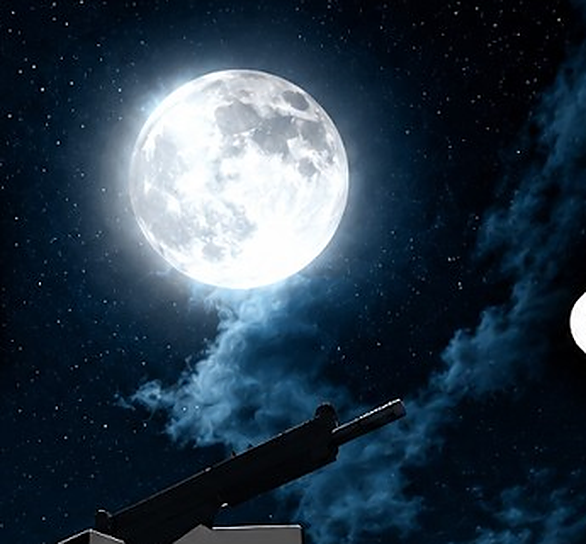
Here's the kind of custom night sky players use:
Where to get ready-made skies
You don't have to build a sky from scratch. Our community keeps dedicated skybox channels where members share ready-to-use skies — you download the one you want and drop it into your skybox profile. It's the fastest way to a great-looking sky, and we cover it on the presets & configs page.
Custom gun sounds
Da Hood guns are loud, and swapping them is a favorite. Put the weapon's fire sound ID in Asset IDs, and in Replace With use another Roblox sound ID, a URL, or a Local .ogg. Add it, clear the cache, relaunch. Keep the replacement short if you find it plays silent.
Custom hitmarker sounds
The hit cue works the same way: hitmarker sound ID in Asset IDs, your sound in Replace With. A distinct hitmarker makes fights read more clearly.
Custom eating sounds
Da Hood has its own food/eating audio, and we exposed it as a swappable option. Point the eating-sound ID at whatever clip you like — a fun, low-stakes tweak unique to Da Hood.
Fake headless
"Headless" is a pricey Roblox look, so Da Hood players use a fake headless option to mimic it cosmetically through asset swapping. Because it's a client-side avatar tweak in Fleasion, it changes how you see your character, not how others do, and grants no advantage. Enable the fake-headless profile (from our Da Hood preset) like any other.
Heads up: Da Hood updates break configs
This is the one Da Hood-specific catch we want to set expectations on. Da Hood updates often, and Roblox can update out of nowhere — and when a game changes its assets, the asset IDs your profiles point at can shift. So a config that worked yesterday might do nothing today. That isn't a Fleasion bug; it's the nature of swapping a live game's assets.
The fix is quick:
- Re-run the scraper and play a round so it captures the current asset IDs.
- Update your profiles (or re-import an updated community preset) with the new IDs.
- Clear the cache and relaunch.
Because of this, a lot of Da Hood players lean on shared presets that the community updates after each patch, rather than maintaining IDs by hand.
Troubleshooting (Da Hood)
- My whole config stopped working → Da Hood/Roblox likely updated. Re-scrape the current IDs and update your profiles (above).
- The sky isn't showing → clear the cache or restart, then join a fresh public server; make sure the profile targets the current skybox IDs.
- A custom sound is silent → the replacement is probably longer than the original, or the cache is stale — shorter clip, clear the cache.
- Setup/launch issues → start Roblox through Fleasion's Env Proxy path and follow the install guide.
Frequently asked questions
How do I change the sky in Da Hood with Fleasion? Add a Replacer profile targeting Da Hood's skybox IDs and point them at your chosen sky in "Replace With." Clear the cache and join a fresh server. Ready-made skies are shared in our community's skybox channels.
How do I get custom gun sounds in Da Hood?
Target the weapon's fire sound ID in "Asset IDs" and set your sound (a Roblox ID, URL, or local .ogg) in "Replace With." Keep the clip short if it plays silent.
What is fake headless in Da Hood? A cosmetic avatar tweak that mimics the headless look through client-side asset swapping. Only you see it, and it grants no advantage.
Why did my Da Hood config stop working after an update? Da Hood and Roblox update often, which can change asset IDs. Re-capture the current IDs with the scraper, update your profiles (or re-import an updated preset), and clear the cache.
Where can I get a ready-made Da Hood sky or config? From our community's dedicated skybox channels and the built-in PreJsons presets. See presets & configs.
Updated July 2026 — added a note on how Da Hood shows up across the community and why presets matter more here.
Related: How to use Fleasion · Custom skyboxes guide · Custom sounds guide · See also Fleasion for Rivals and Phantom Forces