 Fleasionproxy
Fleasion Presets & Configs — Import, Share and Browse
You rarely need to build a setup from scratch, and honestly we didn't want you to have to. A Fleasion preset (a saved config) can hand you a whole game's worth of custom sounds, skyboxes, skins and removals in one import — and you can share your own just as easily. Below we cover the three ways to grab a ready-made setup, how to import and export configs, how our built-in PreJsons browser works, and where to find presets for each game. New here? Read how to use Fleasion first.
This really is how most people use Fleasion: configs and presets come up in 23 of the 32 community guides we've catalogued — second only to install itself. Grabbing a ready-made setup is the norm, not a shortcut.
Three ways to get a ready-made setup
Three sources, easiest first:
| Source | What it is | Best for |
|---|---|---|
| PreJsons | A browser of community presets we built into Fleasion | The fastest, no-file way to grab a game's setup |
| Shared JSON config | A config someone exported that you paste in | Using a specific setup a friend or creator shared |
| Community channels | Our Discord channels for skies, sounds, skins, configs | Hand-picking individual skies/sounds to mix yourself |
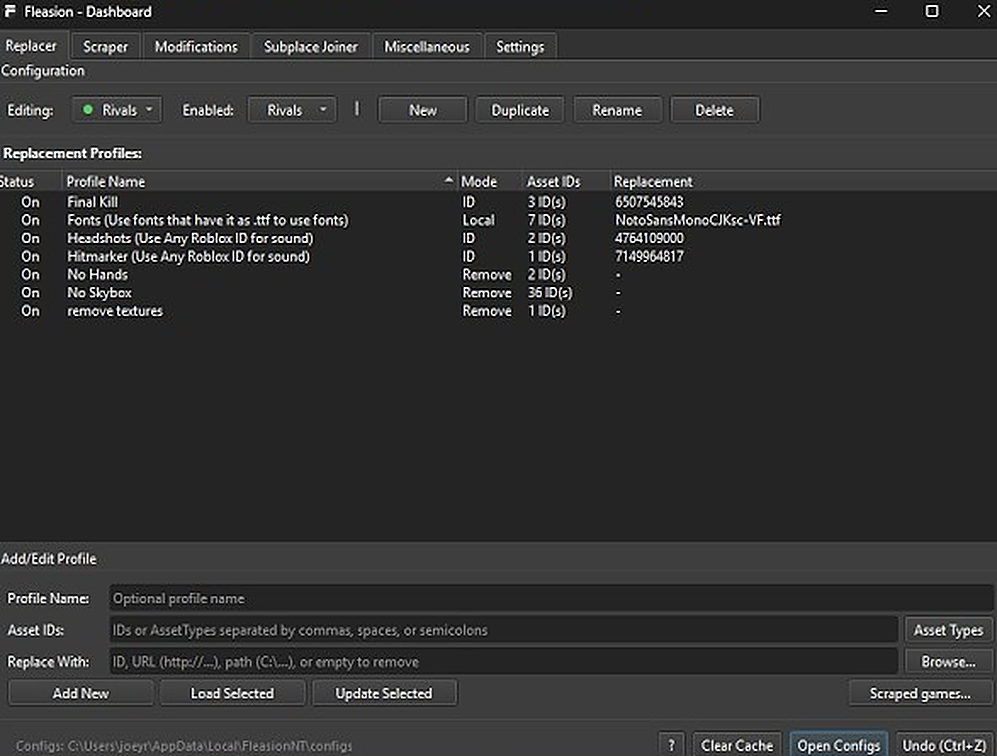
All three end up as profiles in the Replacer tab, which you then enable or disable to taste.
What are PreJsons?
PreJsons are community presets we built right into Fleasion. Open the PreJsons view and Fleasion fetches the available presets and shows them in a grid — each card has the game's name, a thumbnail, and when it was created/updated. Pick one and it sets up the profiles for you: no IDs to hunt, no files to paste. It's the quickest route to a good-looking game, and your own exported setups can be added to PreJsons too.
Importing a config (JSON)
If someone shared a config as JSON, here's how to load it:
- In Replacer, click Open Configs. That opens your Fleasion configs folder (they live at
AppData\Local\FleasionNT\configs). - Paste the shared config's JSON into a config there, or add the complete config file. For v2.4.0 portable setups, keep the companion asset folders beside it:
/Sounds/hit.oggresolves inside that config's asset root. - Back in Fleasion, switch to that config. The folder watcher refreshes imported or externally edited configs while the app is running.
- Enable the profiles you want, clear the cache, launch Roblox.
That's it — the shared setup is yours to tweak.
Exporting and sharing your config
Same thing in reverse:
- Click Open Configs and open your current config.
- Copy its JSON.
- Send it to whoever you're sharing with, or add it to PreJsons so others can browse it.
Since a config is JSON, it is easy to post, save and version. For a setup that contains local sounds, textures or models, use /Folder/file.ext references and share the folder tree with the JSON. Fleasion supports nesting up to 10 levels; an absolute C:\Users\… path remains tied to one computer.
Portable config example
Keep the JSON at the config root and local files underneath it:
MySetup/
├── config.json
├── Sounds/hit.ogg
└── Models/rifle.obj
The replacement values become /Sounds/hit.ogg and /Models/rifle.obj. Do not add a creator's absolute home-directory path, and inspect shared JSON before loading it.
Preset catalog — by game
Presets are organized by game, and a typical one for each bundles the popular customizations for that title. Use this as a map of what to look for in the PreJsons grid or our community channels, then jump to the matching game guide for the details:
| Game | A typical preset includes | Guide |
|---|---|---|
| Phantom Forces | Skins, Aurora skybox, red dot → delta / Kousaku, custom hit/kill sounds, no-arms | Guide |
| Rivals | Hit/kill sounds, custom skybox or no-skybox, no-arms, no-textures, skins, fonts | Guide |
| Da Hood | Custom sky, gun/hitmarker/eating sounds, fake headless | Guide |
| AR2 | Sights, weapon/hit sounds, skins, texture removal | Guide |
| FJTR | Finish tweaks, transition polish, HUD cleanup | Guide |
Presets are community-made and updated over time — especially handy for games like Da Hood that change often, where a maintained preset saves you re-finding IDs after each update.
After importing: enable, disable, avoid conflicts
A preset usually contains several profiles — you don't have to use all of them:
- Turn profiles on/off with Enable/Disable Selected. Keep what you like, disable the rest.
- Watch for conflicts. Two profiles targeting the same asset fight each other, and some effects won't apply if statuses clash. If something doesn't work after importing, disable overlapping profiles.
- Clear the cache after any change and relaunch — presets follow the same rule as manual edits.
Where to get presets
- In-app PreJsons — the grid we built in, browsable by game.
- Community channels — our Discord keeps dedicated channels for skies, sounds, skins and full configs (see custom skyboxes and custom sounds for specifics).
- Shared JSON — creators and friends often post their configs directly.
Troubleshooting presets
- The preset does nothing → clear the cache / restart (turn on "Clear Cache on Launch"), and confirm the profiles' Status is On.
- Only part of it works → conflicting profiles; disable overlapping ones, or the game updated and some IDs shifted (re-capture with the scraper).
- The imported JSON won't load → make sure you pasted the full, valid JSON into a config via Open Configs, then switched to it.
- It worked, then broke → the game updated; grab an updated preset or re-scrape the IDs.
Frequently asked questions
How do I add a preset in Fleasion? The fastest way is the built-in PreJsons grid — browse by game and pick one. Or import a shared JSON: click Open Configs, paste the JSON into a config, switch to it, clear the cache, launch.
What are PreJsons? PreJsons are community presets we built into Fleasion, shown in a grid by game with thumbnails and dates. Selecting one sets up the profiles automatically.
How do I share my Fleasion config? Click Open Configs, copy your config's JSON, and send it to others or add it to PreJsons.
Where are Fleasion configs stored?
In AppData\Local\FleasionNT\configs. The Open Configs button in the Replacer tab opens that folder.
How do I make local files portable?
Keep them inside the config's asset folder and use a leading-slash path such as /Sounds/hit.ogg. Preserve the same folder tree when sharing; nesting is supported up to 10 levels.
A preset I imported isn't working — why? Usually a stale cache (clear it and relaunch), conflicting profiles (disable overlapping ones), or a game update that shifted IDs (get an updated preset or re-scrape).
Updated August 15, 2026 — added v2.4.0 portable paths, 10-level nesting and live config watching.
Related: How to use Fleasion · Custom skyboxes · Custom sounds · Game guides: Phantom Forces, Rivals, Da Hood