 Fleasionproxy
Fleasion for AR2: The Complete Customization Guide
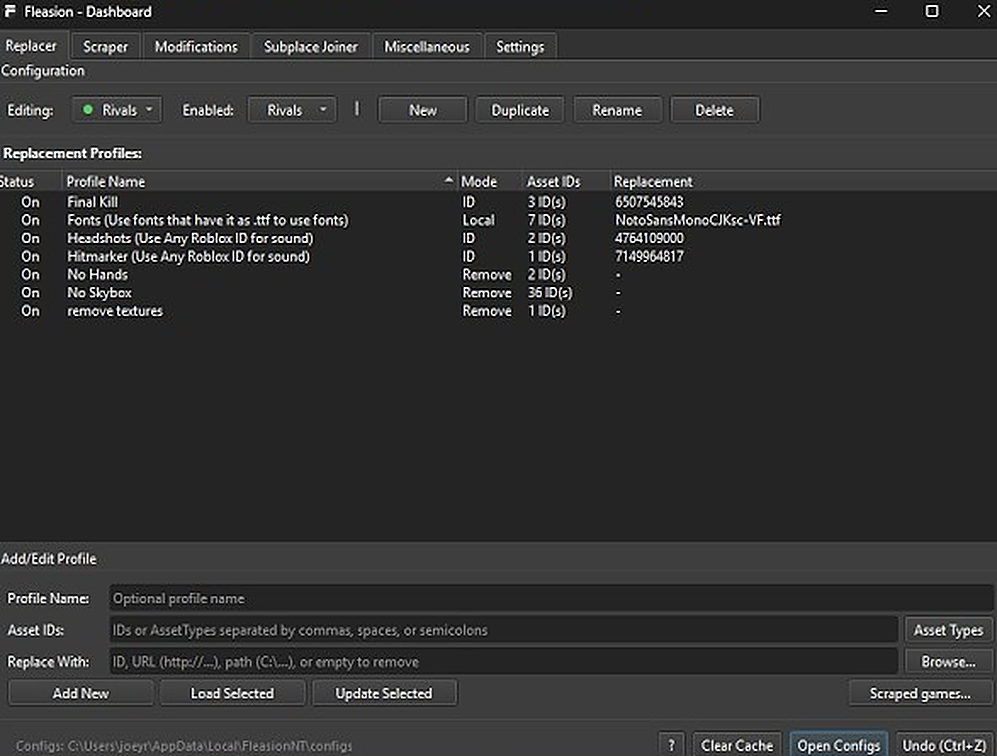
AR2 is one of the six games we ship presets for, so customizing the shooter is quick: swap your sights, give weapons custom fire and hit sounds, change skins, or strip textures for a cleaner, higher-FPS frame — all client-side and non-cheat. Below is every AR2 customization and the exact workflow for each. If you're new to Fleasion, read how to use Fleasion first; here we assume you can add a profile in the Replacer tab.
What you can customize in AR2
Our AR2 options cover:
- Sights / optics — swap the reticle or sight
- Weapon sounds — custom fire/reload audio
- Hit sounds — a custom hit cue
- Weapon skins — change how your guns look
- Texture removal — smooth or strip textures for a flatter, faster frame
Every one is a profile you build in Replacer — an Asset ID to change, and what to replace it with.
Custom sights / optics
Changing your sight is clean and popular.
- In Replacer → Add/Edit Profile, put the sight's asset ID in Asset IDs. Grab it from our AR2 preset's optics list, or capture it with the scraper while you play.
- In Replace With, choose the sight you want (another Roblox asset ID, a URL, or a local image).
- Name it ("AR2 sight"), Add New, clear the cache, relaunch.
Custom weapon (gun) sounds
Weapon audio uses the standard sound-swap flow: put the weapon's fire/reload sound ID in Asset IDs, and your replacement (a Roblox sound ID, a URL, or a Local .ogg) in Replace With. Add it, clear the cache, relaunch.
Keep replacement sounds short. Across Roblox shooters, a replacement that's longer than the original can play silent. If a custom weapon sound seems to do nothing, trim it to the original's length or shorter and clear the cache before you decide the ID is wrong.
Custom hit sounds
The hit cue is set the same way — target the hit-sound ID in Asset IDs and point it at your sound in Replace With. A distinct hit sound makes trades and kills read more clearly.
Custom weapon skins
Swap a weapon's skin by mapping the skin asset you want to change to the one you want instead — the same replace-by-ID flow, using our AR2 preset's skin lists to pick both sides. Since Fleasion only substitutes existing assets on your own client, this is cosmetic: other players don't see it and it grants no advantage. As in other games, custom skins may not appear in a shop but render in matches.
Texture removal (no textures)
Removing textures gives AR2 a flatter, cleaner look and can help performance and target visibility. Build a Remove profile on the texture ID(s): put them in Asset IDs, leave Replace With empty, and the mode becomes Remove. On for the minimal look, off when you don't want it.
A sample AR2 preset
A well-rounded AR2 config usually mixes a custom sight, custom weapon and hit sounds, a favorite skin, and optional texture removal. You don't have to build it all: import a shared JSON config or grab an AR2 PreJson (see presets & configs), then enable what you want and disable the rest. Watch that statuses don't conflict — two profiles on the same asset fight each other.
Troubleshooting (AR2)
- A custom sound is silent → the replacement is likely longer than the original, or the cache is stale. Shorter clip, clear the cache.
- A change didn't apply → clear the cache or restart (turn on "Clear Cache on Launch"); you can't change assets mid-match.
- Everything stopped after an update → games change their assets; re-capture IDs with the scraper and update your profiles.
- Launch/setup issues → start Roblox through Fleasion's Env Proxy path and use the targeted diagnostics in the install guide.
Frequently asked questions
How do I change my sight in AR2 with Fleasion? Add a Replacer profile with the sight's asset ID in "Asset IDs" and your chosen sight (a Roblox ID, URL, or local image) in "Replace With." Clear the cache and relaunch.
How do I get custom weapon sounds in AR2?
Target the weapon's fire/reload sound ID in "Asset IDs" and set your sound (a Roblox ID, URL, or local .ogg) in "Replace With." Keep the clip the same length or shorter than the original, or it may play silent.
Are custom AR2 skins a hack? No. Fleasion only swaps existing skin assets on your own client. Other players don't see the change and it gives no advantage — it's cosmetic.
How do I remove textures in AR2? Create a Remove profile targeting the texture ID(s) with an empty "Replace With." Toggle it on for the minimal, higher-FPS look.
Why did my AR2 config stop working? Game updates can change asset IDs. Re-capture the current IDs with the scraper, update your profiles, and clear the cache.
Related: How to use Fleasion · Custom sounds guide · No arms / no textures · See also Fleasion for Phantom Forces and Rivals