 Fleasionproxy
Fleasion for FJTR: The Complete Customization Guide
FJTR is the odd one out among the games we support — it's a Roblox obby, not a shooter, so we built its customizations around feel and clarity rather than guns and skins. With Fleasion you can polish the finish, tidy up transitions, and clean up the HUD for a smoother, less cluttered run. Below we explain each FJTR option and how to apply it. If you're new to the tool, start with how to use Fleasion.
What you can customize in FJTR
Our FJTR options are all quality-of-life and visual polish:
- Finish tweaks — adjust the wave/obby finish
- Point auto shake — the shake effect tied to scoring points
- Transition polish — smoother scene/stage transitions
- HUD cleanup — remove clutter from the on-screen interface
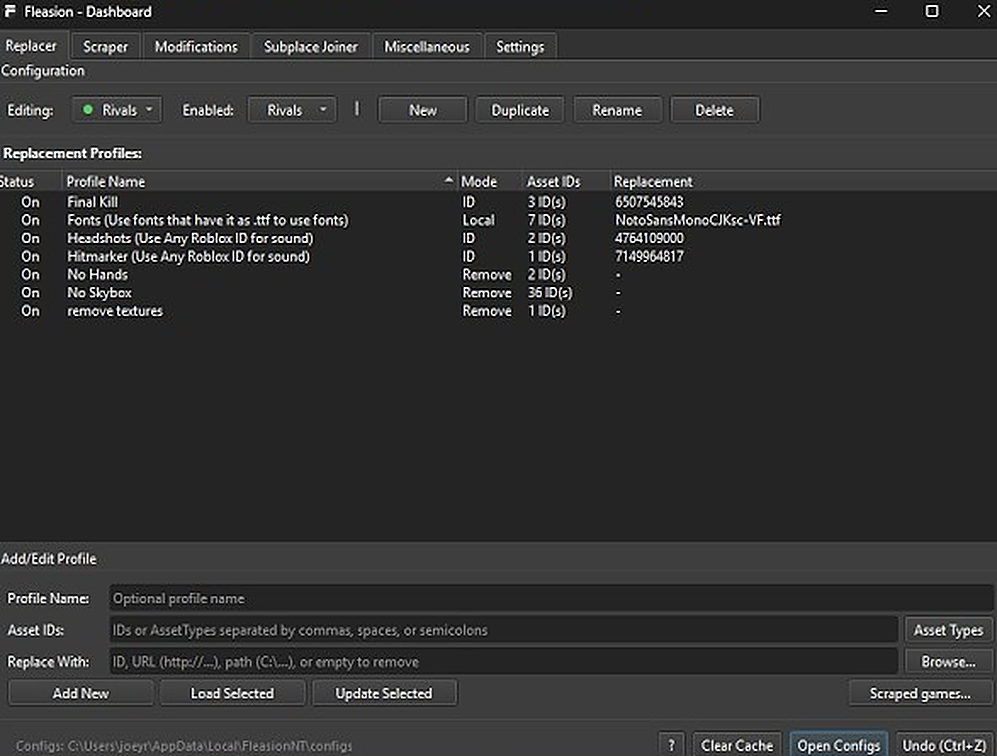
These are profiles, applied the same way as any other game — an Asset ID to change, and what to replace it with (or empty, to remove). The easiest path is our FJTR preset, which groups these so you can toggle them on and off.
Finish tweaks (wave obby finish)
The finish tweak adjusts how the wave/obby finish behaves and looks. In our preset it's a ready-made profile — enable it to apply the tweak, disable it to go back to default. Want a fully custom result? Target the relevant finish asset in Replacer and point it at your own replacement.
Point auto shake
"Point auto shake" governs the screen-shake feedback when you score points. Some players like the extra feedback; others prefer a calmer screen. Toggle the profile on or off to match.
Transition polish
Transition polish smooths the visual transitions between stages, so moving through the obby feels cleaner. Enable the profile to apply it.
HUD cleanup
HUD cleanup strips or simplifies on-screen interface clutter for a tidier, more focused view — handy when you want to concentrate on the run rather than the UI. It's a removal-style tweak, so the profile pulls the extra HUD elements. On for the minimal look, off to restore the full HUD.
Using our FJTR preset
Since FJTR's tweaks are toggles rather than asset hunts, the simplest approach is:
- In Replacer, select FJTR as the game.
- Enable the profiles you want — finish tweak, point auto shake, transition polish, HUD cleanup — with Enable/Disable Selected.
- Clear the cache (or turn on "Clear Cache on Launch") and relaunch Roblox through Fleasion.
You can also import a shared FJTR JSON config or grab an FJTR PreJson from our presets grid — see presets & configs.
Troubleshooting (FJTR)
- A tweak didn't apply → clear the cache or restart (turn on "Clear Cache on Launch"); changes only take effect after a fresh load, and you can't change things mid-run.
- Everything stopped after an update → games change their assets, which can shift IDs; re-capture with the scraper and update the profiles.
- Setup/launch issues → start Roblox through Fleasion's Env Proxy path and follow the install guide.
Frequently asked questions
What can I customize in FJTR with Fleasion? FJTR is an obby, so the options are quality-of-life: finish tweaks (wave obby finish), point auto shake, transition polish and HUD cleanup. There are no gun or skin swaps like in the shooters.
How do I clean up the HUD in FJTR? Enable the HUD cleanup profile in our FJTR preset — it strips or simplifies the extra on-screen interface elements. Clear the cache and relaunch to apply it.
How do I apply the FJTR finish or transition tweaks? Select FJTR in the Replacer tab, enable the finish/transition profiles with Enable/Disable Selected, clear the cache, and relaunch.
Why did my FJTR tweaks stop working? Game updates can change asset IDs. Re-capture the current IDs with the scraper, update your profiles, and clear the cache.
Related: How to use Fleasion · Presets & configs · See also Fleasion for Phantom Forces, Rivals and Da Hood