 Fleasionproxy
What Games Does Fleasion Support?
Short version, from us: Fleasion works with any Roblox game. Because we swap assets at the proxy level — intercepting the textures, sounds and meshes Roblox downloads — it isn't tied to a specific title. Six games ship with built-in presets so you don't have to hunt asset IDs, and the community has ready-made configs for plenty more. Here's the full picture, and how to use Fleasion with a game that isn't on either list.
Games with built-in presets
These six come with curated presets in the app — pick a game, browse its assets, and swap. Each has a full guide:
| Game | Type | What you can customize | Guide |
|---|---|---|---|
| Phantom Forces | FPS | Sounds, skyboxes, skins, sights, arms, Kousaku | Guide |
| Rivals | FPS | Hit/kill sounds, skyboxes, no arms, no textures, skins | Guide |
| Da Hood | Fighting | Skyboxes, gun/hitmarker/eating sounds, fake headless | Guide |
| AR2 | FPS | Sights, weapon/hit sounds, skins, texture removal | Guide |
| FJTR | Obby | Finish tweaks, transition polish, HUD cleanup | Guide |
| Roblox (general) | Any | Avatar tweaks, custom textures, performance presets, minimal UI | What is Fleasion |
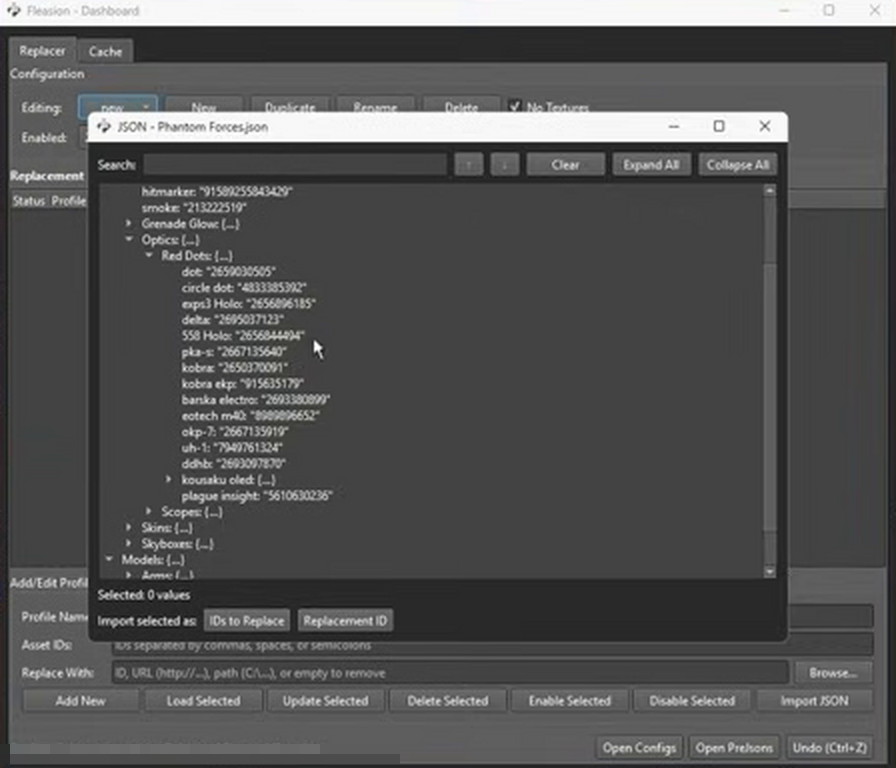
This is what a built-in preset looks like from the inside: we ship the game's assets already sorted into categories — here it's Phantom Forces, with its optics (red dots, holos, the Kousaku), scopes, skins, skyboxes, models and arms — so you pick what to swap instead of hunting IDs.
Games the community has configs for
Beyond the built-in six, players have built and shared Fleasion configs for a lot more titles. Ones we see regularly include:
- Counter Blox
- Arsenal
- Apocalypse Rising
- The Hood
- The Armory
- Town
- Outbreak
- Criminality
- Bad Business
- Zo / Zee-style hoods
These don't have a curated preset in the app, but a shared JSON config or a community PreJson gets you set up in one import — see presets & configs. The list grows as the community shares more, so this isn't exhaustive.
What people actually customize (our own tally)
We watch a lot of what the community makes, so we went through 32 community Fleasion videos — install walkthroughs, config drops, one guide after another — just to see where the real energy goes. It's our own hand-count, not a formal survey, but the pattern is clear enough to be useful:
- Phantom Forces is the most-covered game by a clear margin, then Rivals. Da Hood, AR2 and FJTR show up steadily but less often.
- Getting set up and swapping configs are nearly universal — almost every guide spends time on install and on importing or exporting configs.
- The most-swapped things are no-texture / FPS looks, then hit and kill sounds and skyboxes, then gun sounds.
| Across 32 community Fleasion videos | Shows up in |
|---|---|
| Install / setup steps | 26 |
| Configs & presets (import/export) | 23 |
| No-textures / FPS looks | 15 |
| Hit / kill sounds | 13 |
| Custom skyboxes | 13 |
| Custom gun sounds | 11 |
| Phantom Forces | 11 |
| Rivals | 9 |
| Da Hood | 2 |
Two honest caveats: this is a count of public videos, not everyone's private setup, and popular content isn't quite the same as what every player does at home. But if you've ever wondered "what do people mostly do with this thing?" — that's the shape of it, and it's why our built-in presets lean into sounds, skyboxes and FPS looks first.
Can I use Fleasion with a game that isn't listed?
Yes. Since Fleasion isn't per-game, any Roblox experience is fair game — you just do the ID-finding yourself instead of leaning on a preset:
- Turn on the cache scraper in the Dashboard and play the game normally. It captures every asset the game loads — sounds, textures, meshes, skyboxes — with the exact IDs.
- Preview what it caught in the built-in viewers, then build a replacement profile for the asset you want to change.
- Clear the cache, relaunch, done.
Or, if someone already made a config for that game, just import their JSON.
Why Fleasion works with any game
It's worth understanding why the list is really "everything." The Replacer doesn't read a game's code or hook into it — it swaps asset downloads through the proxy. A texture is a texture and a sound is a sound, whichever game requested it. The only per-game differences are presets, each game's quirks and its rules. This page covers asset swaps; custom FastFlags and Proxy-tab editing are separate advanced features with separate risks.
Frequently asked questions
What games does Fleasion officially support? Six ship with built-in presets: Phantom Forces, Rivals, Da Hood, AR2, FJTR, and general Roblox. But because Fleasion works at the asset-proxy level, it can customize any Roblox game.
Can I use Fleasion with any Roblox game? Yes. For a game without a preset, use the cache scraper to capture its asset IDs and build your own profiles, or import a community config. The mechanic is the same everywhere.
Does Fleasion work with Counter Blox, Arsenal, or Apocalypse Rising? Yes — the community has shared configs for those and others (The Hood, The Armory, Town, Outbreak). Import a shared JSON or PreJson, or scrape the IDs yourself.
Do all games have a built-in preset? No. Only the six above have curated presets in the app. For any other game you use the scraper or a community config.
Updated August 15, 2026 — separated v2.4.0 FastFlags and Proxy diagnostics from the cross-game asset-replacement claim.
Related: What is Fleasion? · How to use Fleasion · Presets & configs · Game guides: Phantom Forces, Rivals, Da Hood, AR2, FJTR