 Fleasionproxy
Fleasion for Phantom Forces: The Complete Customization Guide
Phantom Forces is the game we get asked about most, and it's the one where Fleasion really shines. With our preset you can give your guns custom fire and reload sounds, drop a custom sky over the map, bring back old skins, turn a red dot into a delta, hide your arms, run a Kousaku crosshair, or strip textures for a cleaner frame — all client-side, all non-cheat. Below is every Phantom Forces customization, the exact workflow for each, and the real gotchas we've learned to warn people about (like why some sounds go silent). If you're brand new, read how to use Fleasion first — here we assume you can add a profile.
And "asked about most" isn't just a figure of speech: across the 32 community Fleasion guides we've catalogued, Phantom Forces is the single most-covered game (11) — ahead of Rivals and everything else. It's where the deepest presets and the most recipes live, which is why this guide is our longest.
This is the sort of result you're after — a custom neon skin, live in a match:
What you can customize in Phantom Forces
Quick rundown of what our preset covers:
- Sounds — gun fire/reload/foley, hit markers, kill-confirm cues
- Skyboxes — a custom sky on supported maps
- Skins — swap weapon skins, including bringing back older ones (wireframe is a favorite)
- Sights/optics — e.g. red dot → delta
- Crosshair — the Kousaku setup
- Arms/sleeves — remove left arm, right arm, both, or change sleeves
- Textures — smooth or remove them for performance and clarity
Each one is a profile in the Replacer tab. Here's how.
Custom gun sounds (like AK-105 → R4C)
Swapping weapon audio is one of the first things people do — say, making the AK-105 use the R4C fire sound, or dropping in your own .ogg.
- In Replacer → Add/Edit Profile, put the gun sound's asset ID in Asset IDs. Grab it from our Phantom Forces preset (originals → sounds) or capture it with the scraper while you play.
- In Replace With, use another Roblox sound ID, a Local
.ogg, or a URL. - Name it ("AK-105 → R4C"), Add New, clear the cache, relaunch.
The one thing that trips everyone up: sound length
Phantom Forces has anti-cheat handling that means any replacement sound longer than the one it replaces plays as silence. So keep your clips the same length or shorter than the original. This is, hands down, the number-one "my custom sound doesn't work" cause — it's not broken, it's been trimmed to nothing.
Custom hit & kill sounds (osu, Modern Warfare, Division)
Hit markers and kill cues use the same flow, aimed at the hit/kill sound IDs. Popular picks are an osu! hit sound, a Modern Warfare 2019 kill sound, or the Division headshot cue. Put the hit/kill sound ID in Asset IDs, your sound in Replace With, Add New.
Real talk: not every sound swap works on the first try. We've seen people report a specific kill sound (a Modern Warfare or Division one) staying silent while others play fine. Nine times out of ten it's the length rule above or a stale cache — trim the clip and clear the cache before you decide the ID is wrong.
Custom skyboxes (the "Aurora" look)
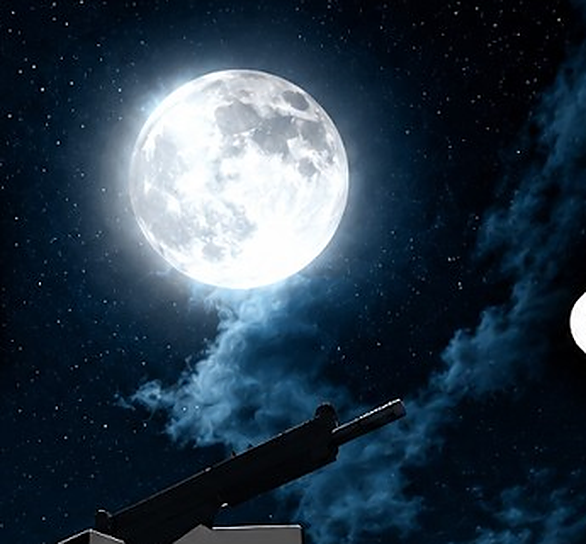
A custom sky is the change people notice most. A popular one is a shiny green Aurora skybox — it pops if your skin has reflectiveness turned up.
- In our Phantom Forces preset (originals → textures → skyboxes), select the skybox IDs. To change the sky on every supported map, select all of them.
- In Replace With, pick a sky from replacements → universal, or your own.
- Name it ("Aurora skybox"), Add New, clear cache, relaunch.
Here's a custom sky in-game:
Why your skybox doesn't work on some maps
Custom skyboxes don't apply on every map — night maps and some newer ones (people mention maps like heat/foxhole) won't show a custom sky at all. That's expected, not a bug on our end. If a sky that normally works suddenly doesn't, clear your cache and reboot your PC, then check you're not on a map that overrides the sky.
Custom skins (wireframe and more)
You can swap weapon skins, including bringing back older ones — the classic wireframe skins are a common ask. Build a profile mapping the skin asset you want to change to the one you want instead; our preset lists group these so you can pick both sides.
Two things we'll be honest about: asset names don't always line up, so a shared skin preset may map imperfectly — some skins in a set work, others don't. And custom skins won't show in the in-game shop, but they still render on your weapon in matches.
Custom sights: red dot → delta
Turning a red dot into a delta reticle is clean and popular.
- In originals → textures → optics → red dots, select it.
- In Replace With, choose delta from the optics list (it's an in-game asset, so you don't even need the replacements section).
- Name it "Red dot → Delta," Add New.
Want to go further? Replace every dot sight with a delta in one profile by selecting all the dot-sight IDs at once.
Kousaku crosshair setup
Kousaku is a fan favorite, and it's the fiddliest one because of how the overlay works.
- To run it you generally have to remove the red dots first (the overlay behaves like the red dot).
- Then you swap the overlay for the Kousaku sight. You can put a small delta in the middle (enable the "Kousaku red dot delta" option) or a dot ("red dot dot" option).
- You can also chop the frame in half, or remove the frame entirely to leave just the reticle (the frame has its own ID you can delete).
The catch: you generally get either Kousaku or the normal red dots, not both. Pick one and enable the matching profiles. Since this juggles several profiles at once, a shared Kousaku preset (or a community PreJson) is the easy path.
Remove your arms / sleeves (left, right, or both)
"No arms" and sleeve changes are removal profiles.
- The arms are 27 asset IDs. Select all of them, leave Replace With empty, and the mode becomes Remove — arms hidden.
- For finer control, keep separate profiles for left arm, right arm and both, then use Enable/Disable Selected. Only the right arm? Enable "arms," disable "left arm." None at all? Enable "delete both arms." Only the left? Disable the right, enable the left.
- Sleeves swap like any other texture.
No textures
Going no-textures smooths or removes textures for a cleaner, higher-FPS frame. Use the "no textures" toggle at the top of the Replacer for the game, or build a Remove profile on the texture IDs. On if you want it, off if you don't.
A sample Phantom Forces preset
A well-rounded config usually mixes several of the above — wireframe skins, a universal Aurora skybox, red dot → delta (or a Kousaku setup), custom hit + kill sounds (trimmed to length), a no-arms option, a thicker pink hit marker. You don't have to build all of it: import a shared JSON config or grab a PreJson (see presets & configs), then enable what you want and disable the rest. Just watch for conflicting statuses.
Troubleshooting (Phantom Forces)
- A custom sound is silent → it's longer than the original (anti-cheat trims it). Shorter sample, then clear the cache.
- The skybox isn't showing → you're probably on a night/newer map that doesn't support it; or clear the cache and reboot your PC.
- A shared skin preset half-works → names don't always match across sets; keep the profiles that work.
- Kousaku and red dots both misbehave → you can't run both; disable one set.
- Nothing applies → clear the Roblox cache / restart (turn on "Clear Cache on Launch"), and make sure you launched Roblox through Fleasion's Env Proxy path. See the install guide.
Frequently asked questions
How do I get custom sounds in Phantom Forces with Fleasion?
Add a Replacer profile with the gun/hit/kill sound ID in "Asset IDs" and your sound (an ID, URL, or local .ogg) in "Replace With." Keep the replacement the same length or shorter than the original, or anti-cheat silences it.
Why is my custom Phantom Forces sound silent? It's longer than the sound it replaces. Phantom Forces silences over-length replacement sounds. Trim the sample and clear the cache.
Why doesn't my custom skybox work in Phantom Forces? Custom skyboxes don't apply on night maps or certain newer maps. On supported maps, clear your cache and reboot your PC if it still doesn't show.
How do I remove my arms in Phantom Forces? Make a Remove profile targeting all 27 arm asset IDs (leave "Replace With" empty). Use separate left/right/both profiles with Enable/Disable Selected for finer control.
Can I run Kousaku and red dots at the same time? No — it's generally one or the other. Remove the red dots to run Kousaku, and enable the matching Kousaku profiles.
Do custom skins show in the shop? No. They don't appear in the in-game shop, but they still render on your weapon in matches.
Updated July 2026 — added a note on Phantom Forces being the most-covered game across the community.
Related: How to use Fleasion · Custom sounds guide · Custom skyboxes guide · See also Fleasion for Rivals