 Fleasionproxy
Fleasion for Rivals: The Complete Customization Guide
Rivals is one of the most-customized games in Fleasion, and we get why — a few profiles get you custom kill and hit sounds, a custom sky, no arms and no textures for a cleaner competitive frame, and skins, with no cheat or exploit anywhere in it (we only swap assets that already exist). Below we walk through every Rivals customization, and we'll even show you a real, working config with its actual asset IDs. New here? Start with how to use Fleasion; this page assumes you can add a profile.
That's not just our impression: across the 32 community Fleasion guides we've catalogued, Rivals is the second most-covered game (9), just behind Phantom Forces — and in Rivals specifically, hit and kill sounds are the swap people reach for first.
What you can customize in Rivals
Here's what our preset lets you change in Rivals (by Nosniy Games):
- Sounds — hit sounds, kill/final-kill cues, gun sounds
- Skyboxes — a custom sky, or no sky at all
- Arms — remove your hands ("no arms")
- Textures — remove them for a flatter, higher-FPS look
- Skins — swap weapon/character skins
- Fonts — even the in-game font
Every one is a profile in the Replacer tab.
A real Rivals config
The quickest way to get Rivals is to see a real setup, so here's an actual working config in Fleasion's Replacer tab:
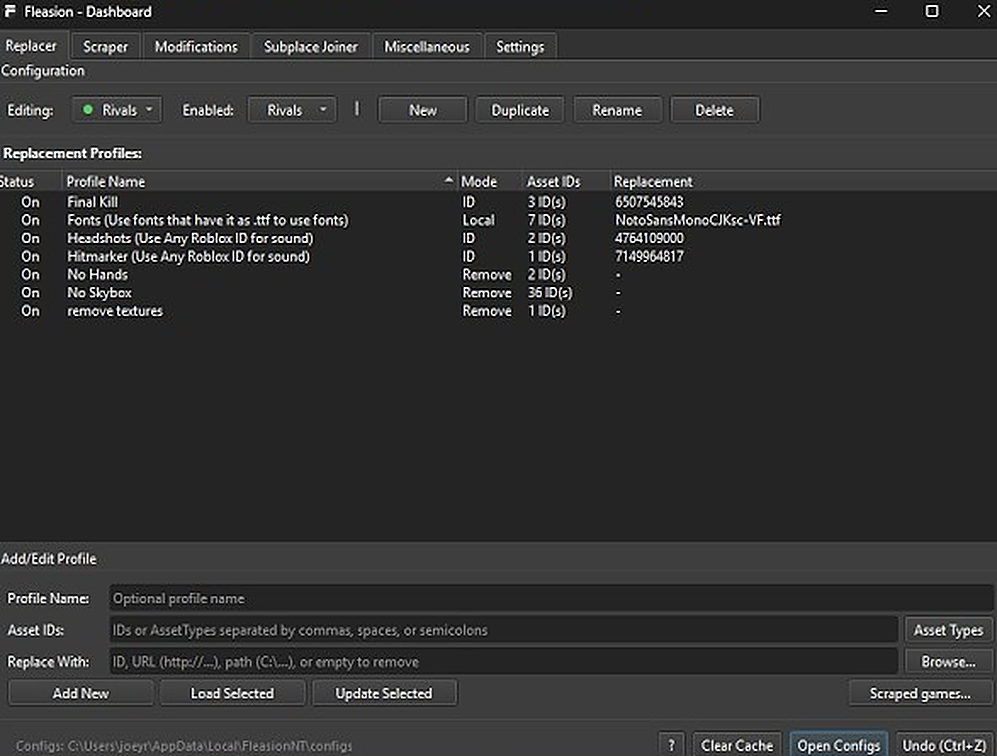
Broken out, the profiles and their asset IDs:
| Profile | Mode | Asset IDs | Replacement |
|---|---|---|---|
| Final Kill | ID | 3 IDs | 6507545843 |
Fonts (a .ttf) |
Local | 7 IDs | NotoSansMonoCJKsc-VF.ttf |
| Headshots (any Roblox sound ID) | ID | 2 IDs | 4764109000 |
| Hitmarker (any Roblox sound ID) | ID | 1 ID | 7149964817 |
| No Hands | Remove | 2 IDs | — |
| No Skybox | Remove | 36 IDs | — |
| remove textures | Remove | 1 ID | — |
Recreate it by adding each profile in Replacer, or import a shared JSON so it's all set at once (see presets & configs). These IDs are a genuine working example — drop in your own sound/skin IDs in the same slots; it's the structure that matters.
Custom hit & kill sounds (Final Kill, Headshots, Hitmarker)
Sounds are the most satisfying Rivals tweak. Notice in the config above that the hit and kill cues use ID mode, pointing at a Roblox sound:
- Hitmarker — replaces the default hit sound with any Roblox sound ID (
7149964817in the example), targeting a single ID. - Headshots — a distinct headshot cue, again "any Roblox sound ID" (
4764109000). - Final Kill — the end-of-round/final-kill cue (
6507545843).
To set your own: put the game's hit/kill sound ID in Asset IDs, and in Replace With use any Roblox sound ID, a URL, or a Local .ogg. Name it, Add New, clear the cache, relaunch. If a custom sound plays silent, it's usually too long or the cache is stale.
Custom gun sounds
Gun sounds work like hit sounds — target the weapon's fire/reload sound ID and point it at your replacement (an ID, a URL, or a local file). Use the scraper while you play to grab the exact ID of the sound you want to change.
Custom skyboxes (or no skybox)
Rivals players go two ways with the sky:
- Custom skybox — replace the skybox IDs with a sky of your choice (browse the replacements/universal list).
- No skybox — the "No Skybox" profile above is a Remove profile bundling 36 skybox IDs with an empty replacement, giving a clean, distraction-free backdrop a lot of competitive players prefer.
To remove the sky, select those skybox IDs, leave Replace With empty (Mode becomes Remove), name it "No Skybox," add it.
No arms (no hands)
The "No Hands" profile is a Remove profile targeting the arm/hand IDs (2 in the example) with an empty replacement. It hides your first-person hands for an unobstructed view. Select the hand IDs, leave the replacement empty, add the profile.
No textures
The "remove textures" profile removes a texture (1 ID in the example) for a flatter, higher-FPS frame — popular for competitive visibility. Stack "No Hands + No Skybox + remove textures" and you've got the classic minimal Rivals look.
Custom skins (a "skin changer" without hacks)
You can swap Rivals skins by mapping the skin asset you want to change to the one you want instead — the same replace-by-ID flow. Since we only substitute existing assets on your own client, this is a cosmetic skin change, not a hack: other players don't see it, and it grants no advantage. As in other games, custom skins may not appear in a shop but render in matches.
Custom fonts (bonus)
The example config even swaps the in-game font using Local mode with a .ttf (NotoSansMonoCJKsc-VF.ttf) across 7 font IDs. Want a different font? Point those IDs at your own .ttf via Browse.
Troubleshooting (Rivals)
- A custom sound is silent → the replacement is likely longer than the original, or the cache is stale. Shorter clip, clear the cache.
- The sky/skin didn't change → clear the Roblox cache or restart (turn on "Clear Cache on Launch"); you can't change assets mid-match.
- Everything stopped after an update → games change their assets; re-capture IDs with the scraper and update the profiles.
- Roblox won't launch / setup issues → start Roblox through Fleasion's Env Proxy path and use the targeted diagnostics in the install guide.
Frequently asked questions
How do I get custom hit sounds in Rivals with Fleasion?
Add a Replacer profile with the hit/kill sound ID in "Asset IDs" and any Roblox sound ID (or a URL / local .ogg) in "Replace With." In a real config, the Hitmarker profile points at ID 7149964817 and Headshots at 4764109000.
How do I go no arms and no textures in Rivals? Create Remove profiles: "No Hands" targeting the hand IDs and "remove textures" targeting the texture ID, both with an empty "Replace With." Add a "No Skybox" Remove profile for the full minimal look.
Is a Fleasion skin changer for Rivals a hack? No. It only swaps existing skin assets on your own client. Other players don't see it and it gives no advantage — it's cosmetic.
Why did my Rivals config stop working? Game updates change asset IDs. Re-capture the current IDs with the scraper, update your profiles, and clear the cache.
Where do I get a ready-made Rivals config? Import a shared JSON via "Open Configs," or pick a Rivals preset from the built-in PreJsons grid. See presets & configs.
Updated July 2026 — added a note on how heavily the community customizes Rivals.
Related: How to use Fleasion · Custom sounds guide · No arms / no textures · See also Fleasion for Phantom Forces