 Fleasionproxy
Custom Hit and Kill Sounds with Fleasion
Custom hit markers and kill sounds are the swap people ask us about most, especially in Rivals and Phantom Forces — that little tsk when you land a shot, or your own clip when you get a kill. It's quick to set up, and it's one of the tidiest changes you can make. Here's exactly how we do it.
It's not just a feeling: across the 32 community Fleasion guides we've catalogued, hit and kill sounds turn up in 13 of them — tied with skyboxes as the single most-covered combat swap, behind only the basics of setup and configs. So if it seems like everyone runs a custom hitmarker, they roughly do.
First, a note on what's tasteful
Hit and kill sounds are popular partly because they're purely feedback — you're changing a sound you hear when you land a shot, nothing about how the game plays for anyone else. It's the same cosmetic, client-side swap as everything else Fleasion does; see Is Fleasion safe? for our honest take on that. Keep the same common sense you'd use anywhere: a short, clean clip beats a loud meme that drowns out the match.
What you'll need
- Fleasion installed and running — if you're new, start with the install guide.
- The game's config loaded in Fleasion (import the JSON for Rivals, Phantom Forces, etc., under Originals → the game), or start from a preset.
- Your sound, ideally as a short audio file on your PC (see the note below on why a file beats an asset ID).
Steps
- Open the game's asset list. In the Replacer, go to Originals and pick the game (e.g. Rivals). You'll see the swappable entries.
- Find the hit / kill sound entry. Look for the hit-marker or "body hit" sound — in Rivals there's essentially one body-hit entry, so it's easy to spot. Kill and death sounds are listed the same way where a game exposes them.
- Point it at your sound. With that entry selected, use IDs to replace → Browse, then choose your sound file (or paste an asset ID — but read the next section first). Confirm the selection so it's applied.
- Save and clear the cache. Save your change, then clear the Roblox cache or restart Roblox so it re-downloads through the proxy. This is the step people forget — without it, nothing changes.
- Test it in-game. Land a shot. If it's silent, jump to the FAQ below.
That's the whole loop. To add several (hit and kill and death), repeat step 2–3 for each entry.
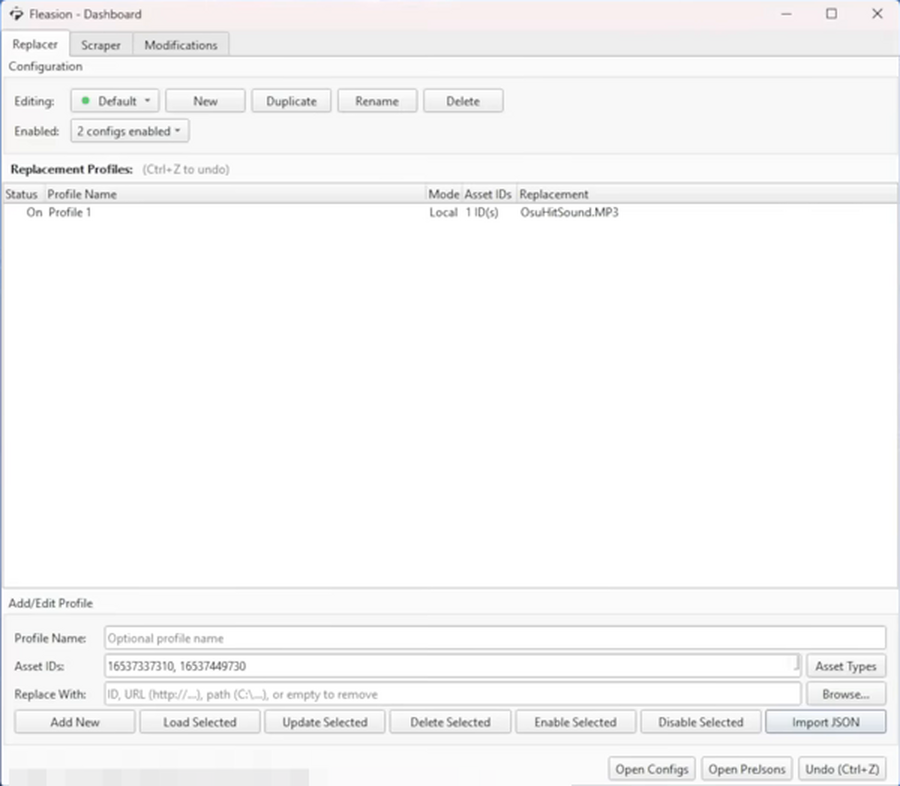
Here's the finished setup in the Dashboard: a profile in Local mode, aiming a body-hit asset ID at our own OsuHitSound.MP3. That "Local" bit is the whole trick — it plays a file straight off your PC, which is exactly why we recommend a file over a Roblox ID (next section).
Use your own audio file, not a private asset ID
This is the mistake we see most. You can type a Roblox audio asset ID into the replacement — but Roblox keeps most uploaded audio private, and a private audio ID won't actually play for you. That's why swaps that "should work" end up silent. The reliable path is to add your own audio file (a short MP3) directly, so Fleasion serves the clip itself instead of relying on a Roblox ID that may be locked. If you're pulling a sound someone shared, grab the actual file, not just the number.
Sharing and importing sound configs
The community trades hit/kill-sound setups as configs. To load one, drop the config file into your Fleasion configs folder (Open Configs → the plus, or just drag the file in), then enable it under your editing/enabled list. If the pack came with audio files, keep those with it — a config that references a sound you don't have will play nothing. More on this in our presets & configs guide.
Frequently asked questions
How do I get custom hit sounds in Rivals? Load the Rivals config in Fleasion, find the body-hit sound entry in the Replacer, point it at your own audio file with IDs to replace → Browse, then clear the Roblox cache. Full steps are above.
My custom hit sound is silent — why? Almost always because you used a private Roblox audio asset ID, which won't play. Use an actual audio file (a short MP3) instead. Also make sure you cleared the cache after the change.
Can I change the kill or death sound too? Yes, wherever the game exposes those entries — the process is identical. Repeat the swap for each sound you want.
Do custom hit sounds affect other players? No. It's a client-side sound only you hear. It changes nothing for anyone else in the match.
Updated July 2026 — added a real screenshot of a hit-sound profile in the dashboard and a note on how common this swap actually is.
Related: Custom sounds · Fleasion for Rivals · Presets & configs · Is Fleasion safe?