 Fleasionproxy
How to Add Custom Sounds in Fleasion
Custom sounds are, for our money, the most satisfying thing you can do with Fleasion — a punchy hit marker, your favorite kill cue, a new gun sound, and the whole game feels different. We built three ways to set one (another Roblox sound, a link, or your own file), and there's one rule that trips up almost everyone, so we'll get it out of the way early: a replacement that's longer than the original plays silent. We wrote this once, in full, so the game guides can just point you here. For game-specific IDs, jump to Phantom Forces, Rivals, Da Hood or AR2.
We're not alone in loving them: in the 32 community Fleasion guides we've catalogued, gun sounds show up in 11 and hit/kill sounds in 13 — sound swaps of one kind or another are among the two or three most-covered things people do with the tool.
Which sounds can you change?
If Roblox plays it, we can usually swap it:
- Gun sounds — fire, reload, foley
- Hit markers — the cue when you land a shot
- Kill / final-kill cues — the sound on a kill or round-ending kill
- Headshot cues — a distinct hit sound for headshots
- Game-specific audio — like Da Hood's eating sounds
- UI sounds — menu and interface cues
Each is a profile in the Replacer tab: the sound's Asset ID on one side, your replacement on the other.
The three ways to set a custom sound
The Replace With field takes three kinds of source — pick whichever's easiest:
| Method | Put in "Replace With" | Best for |
|---|---|---|
| Roblox sound ID | Another Roblox audio asset ID | A sound that's already on Roblox (fastest) |
| URL | A direct http://… link |
Audio hosted on a CDN (Discord/Cloudflare) |
| Local file | A path to an .ogg on your PC (via Browse) |
Your own sound that isn't on Roblox |
All three do the same job — when the game asks for the original, we serve yours.
Step by step: add a custom sound
- Open Dashboard → Replacer and select your game.
- Put the sound's asset ID in Asset IDs. To find it, browse the game's preset sound list or capture it with the scraper while you play.
- In Replace With, add your replacement — a Roblox sound ID, a URL, or a local
.ogg(Browse). - Name it clearly ("Custom hitmarker," "AK gun sound").
- Add New. It shows up with Status: On.
- Clear the Roblox cache (or turn on "Clear Cache on Launch"), then launch Roblox. Your sound plays once the game re-downloads through the proxy.
The one rule: keep it the same length or shorter
Here's the detail behind 90% of "my custom sound doesn't work" messages we get: a replacement sound that's longer than the sound it replaces plays as silence. This is strictest in Phantom Forces, where anti-cheat handling trims over-length audio to nothing.
So before you swap:
- Match or undercut the length. Trim your clip to the same length or shorter than the original.
- Use short, punchy samples for hit/kill markers — they're meant to be brief anyway.
- If a sound comes out silent, assume length first, trim, and clear the cache — the ID is usually fine.
Any audio editor (Audacity, or whatever you've got) will shorten a clip in seconds.
Where to get the sound (and the ID)
A few options:
- Reuse a Roblox sound. If the sound you want already exists on Roblox, just use its asset ID — no files needed.
- Capture IDs with the scraper. It records every sound a game loads, so you can grab the exact ID of "that gun's fire sound" and preview it in the built-in audio player.
- Community shares & presets. Players share sound packs and configs; importing a shared JSON or a PreJson sets everything up at once.
- Your own audio. Any short
.oggon your PC works as a local replacement.
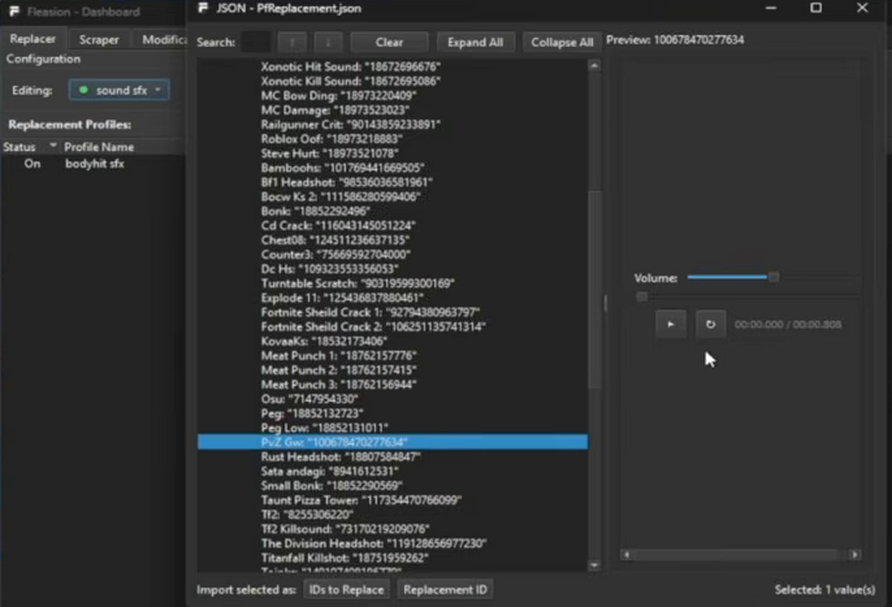
This is the fast way to shop for a sound: the JSON viewer lists named options (Xonotic hit, TF2 killsound, Titanfall killshot, and so on) with their IDs, and the built-in audio player on the right lets you hit play and hear one before you commit. Found it? Use Import selected → Replacement ID and it drops straight into your profile.
Using your own audio file (local .ogg)
To use a sound that isn't on Roblox:
- Get or export the clip as an
.ogg, trimmed to the original's length or shorter. - In the profile's Replace With, click Browse and select the file (sets the mode to Local).
- Add the profile, clear the cache, relaunch.
Since the file lives on your PC, it loads locally through the proxy — no upload required.
Applying it: clear the cache
Sounds only update after Roblox re-downloads them. Clear the cache or restart Roblox after adding one, and turn on Clear Cache on Launch so it's automatic. You can't change sounds mid-match either — exit, edit, relaunch.
Troubleshooting custom sounds
- The sound is silent → it's longer than the original (especially in Phantom Forces). Trim to the same length or shorter, then clear the cache.
- The old sound still plays → cached copy. Clear the cache / restart; turn on "Clear Cache on Launch."
- Nothing changed at all → wrong asset ID, or the profile is disabled. Re-capture the ID with the scraper and confirm Status is On.
- It worked, then stopped → the game updated and IDs shifted; re-scrape and update the profile.
Frequently asked questions
How do I add a custom sound in Fleasion?
In the Replacer tab, put the sound's asset ID in "Asset IDs" and your replacement (a Roblox sound ID, a URL, or a local .ogg) in "Replace With." Name it, Add New, clear the cache, relaunch Roblox.
Why is my custom sound silent? Because it's longer than the sound it replaces. Roblox shooters — Phantom Forces especially — silence over-length replacement sounds. Trim your clip to the same length or shorter and clear the cache.
Can I use my own sound file?
Yes. Use Local mode: click Browse and select a short .ogg on your PC. It loads locally through the proxy, no upload needed.
How do I find the ID of the sound I want to change? Enable the scraper and play — it captures every sound the game loads, with an audio preview, so you can copy the exact ID into a profile.
My custom sound stopped working after an update. Why? Game updates can change asset IDs. Re-capture the current ID with the scraper, update the profile, and clear the cache.
Updated July 2026 — added a screenshot of the sound library and audio player, plus a note on how common sound swaps are.
Related: How to use Fleasion · Custom hit & kill sounds · Phantom Forces sounds · Rivals sounds · Presets & configs