 Fleasionproxy
No Arms and No Textures in Fleasion
"No arms" and "no textures" are the two removals people run most, and we get why — a cleaner first-person view and a flatter, higher-FPS frame that a lot of competitive players swear by. Both work the same way in Fleasion: a Remove profile that strips an asset entirely. Below we show you how to hide your arms (left, right or both), go no-textures, combine them for the minimal look, and — since people keep asking us — whether hiding your arms counts as cheating. New here? Read how to use Fleasion first.
Just how popular is this look? Of the 32 community Fleasion guides we've catalogued, 15 touch the no-textures / FPS setup — the single most-covered thing after the basics of install and configs. It's the one competitive players reach for first, usually for visibility and frames.
What "removing" an asset means
Removing is a profile with an empty "Replace With." When the game asks for that asset, we serve nothing — so it doesn't appear. In the Replacer list, the Mode shows Remove.
To build any removal:
- In Replacer → Add/Edit Profile, put the asset ID(s) you want gone in Asset IDs.
- Leave Replace With empty (it says empty to remove). If the field insists on a value, a placeholder still counts as "remove."
- Name it, Add New, clear the cache, relaunch.
That's the whole mechanic. "No arms," "no textures," and "no skybox" are all just this, pointed at different IDs.
Removing your arms (no arms / no hands)
Arms aren't a single asset — they're several IDs. In Phantom Forces the arms are 27 asset IDs; in Rivals, a "No Hands" profile targets the hand IDs (2 in a real config).
- Select all the arm/hand IDs at once in Asset IDs (use the game's preset, which groups them).
- Leave Replace With empty → Mode becomes Remove.
- Name it "No arms," add it.
Left arm, right arm, or both
For finer control, keep separate profiles for the left arm, the right arm, and both, then use Enable/Disable Selected:
- Only the right arm? Enable "arms," disable "left arm."
- No arms at all? Enable the "both arms" removal.
- Only the left? Disable the right, enable the left.
Mix the profiles and you dial in exactly which arm shows.
Going no textures
"No textures" strips textures for a flatter, cleaner look — a lot of players find it helps visibility and frame rate.
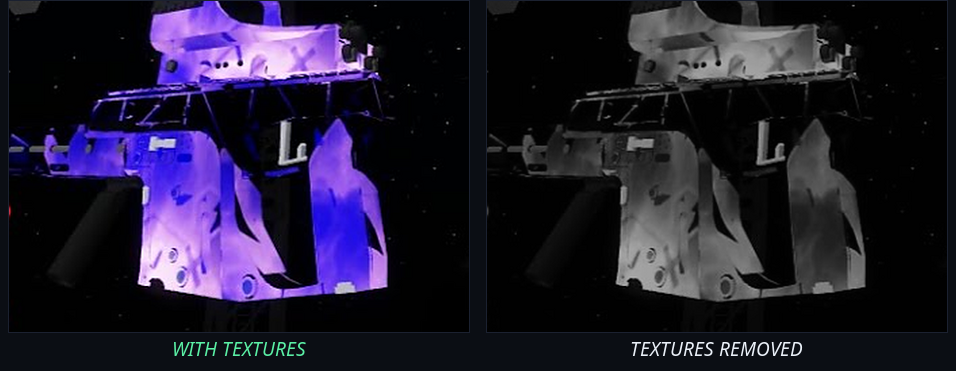
Same weapon, both ways: on the left it's carrying a texture (here a custom skin), on the right the texture's stripped out. That flat, high-contrast surface on the right is the "no textures" look — easier to read at a glance, with a small FPS bump on top.
- Build a Remove profile on the texture ID(s) with an empty replacement. In a real Rivals config, "remove textures" targets a single texture ID.
- Some games also give you a "no textures" toggle at the top of the Replacer — flip it on for the minimal look, off to restore textures.
There's also a scraper route some players prefer: make a new profile, set its Asset Type to Texture Pack, name it, and add it — no FastFlags needed. Be honest with your expectations, though: on its own it's a modest FPS bump (think a few percent of GPU load), not the big win you get from FastFlags.
If you'd rather smooth textures than remove them, that's a Modifications/FastFlags setting — see max FPS.
The full minimal look: no arms + no textures + no skybox
Stack three removals and you get the classic minimal competitive setup:
- No arms — unobstructed first-person view
- No textures — flat, high-contrast surfaces
- No skybox — a clean backdrop (see custom skyboxes → no skybox)
Enable all three, make sure their statuses don't conflict, clear the cache, relaunch.
Is removing your arms cheating?
A fair question, and it deserves a straight answer from us. No — the built-in removals are non-cheat. Here's our reasoning:
- Hiding your arms or textures changes only your own view. It reveals nothing that was hidden from you, gives no aim assistance, and shows other players nothing different.
- The built-in customizations are meant to stay inside game moderation guidelines (for the supported shooters, aligned with StyLiS Studios' guidance).
- It's a visibility/comfort preference, like turning graphics down — not an exploit.
We're not going to pretend any third-party tool is guaranteed risk-free, though. Stick to the built-in options, use official builds, and respect each game's rules. For the full safety and ban picture, read Is Fleasion safe?.
Per-game notes
- Phantom Forces — arms are 27 IDs; sleeves swap like a texture; no-textures and no-skybox are popular here. See Fleasion for Phantom Forces.
- Rivals — a real config uses "No Hands" (2 IDs) and "remove textures" (1 ID). See Fleasion for Rivals.
- AR2 — texture removal is a supported option; see Fleasion for AR2.
- Da Hood — more about skies/sounds than arm removal, but the same Remove mechanic applies.
Troubleshooting removals
- Arms/textures still show → you didn't select all the IDs (arms are many), or the profile is off. Select the full set and confirm Status is On.
- Nothing changed → clear the cache / restart (turn on "Clear Cache on Launch"); you can't change assets mid-match.
- Sleeves show up red or blue → a known quirk of swapping sleeve assets — a placeholder color shows when a sleeve is removed/replaced imperfectly. Re-check the sleeve profile, or use a shared preset that handles it.
- It broke after an update → IDs shifted; re-capture with the scraper and update the profile.
Frequently asked questions
How do I remove my arms in Fleasion? Create a Remove profile targeting all the arm/hand IDs (27 in Phantom Forces) with an empty "Replace With." Use separate left/right/both profiles with Enable/Disable Selected for finer control. Clear the cache and relaunch.
How do I go no textures in Fleasion? Build a Remove profile on the texture ID(s) with an empty replacement, or use the "no textures" toggle in the Replacer. Clear the cache and relaunch.
Is hiding your arms cheating in Roblox? No. It only changes your own view, reveals nothing hidden, and gives no aim assistance — it's a visibility preference, and the built-in options aim to stay inside game moderation guidelines. As with any third-party tool, use official builds and follow game rules.
Why are my sleeves red or blue? A known quirk when a sleeve asset is removed or replaced imperfectly and a placeholder color shows. Re-check the sleeve profile, or use a preset that handles sleeves cleanly.
How do I get the full minimal look? Enable no arms, no textures, and no skybox together (make sure statuses don't conflict), then clear the cache and relaunch.
Updated July 2026 — added a before/after of the no-textures look and a note on how common this setup actually is.
Related: How to use Fleasion · Custom models (.obj) · Is Fleasion safe? · Custom skyboxes (no skybox) · Max FPS