 Fleasionproxy
Custom Models, OBJ and Rigged GLB Export in Fleasion
Fleasion can replace a game's 3D meshes with your own .obj and inspect the meshes Roblox downloads. In v2.4.0, the exporter also detects embedded rigs and writes a single .glb with geometry, skeleton and skin weights. OBJ remains the straightforward static replacement workflow; GLB is the portable rigged export path.
OBJ replacement and GLB export are different jobs
| Format | Best use in Fleasion | Keeps rig and skin weights? |
|---|---|---|
.obj |
Static custom replacement and broad editor compatibility | No |
.glb |
Exporting a captured rigged mesh as one portable file | Yes |
The v2.4.0 parser covers mesh v6/v7 raw and Draco-compressed data more reliably and chooses high-quality LOD data when available. That improves export reliability; it does not guarantee that every third-party 3D tool will reproduce Roblox materials or animation behaviour exactly.
Fair warning that this is one of the more advanced swaps. In the 32 community Fleasion guides we've catalogued, custom textures, skins and models turn up in about 10 — well behind sounds, skyboxes and the no-textures look. It's powerful, but it isn't usually the first thing people try, so it helps to already be comfortable with a basic replacement profile before you tackle a full model.
What Fleasion accepts
Fleasion works with Roblox's own model formats (RBXM / RBXMX) and with plain .obj files, and it can preview and convert between formats (including SolidModel XML to OBJ). So a shared custom model usually comes as two files: a config (JSON) that tells Fleasion what to replace, and the .obj (or mesh) itself that is the replacement.
Swapping in your own .obj
Here's the flow we use — it mirrors how the community shares custom skins:
- Get the model files. A shared skin comes as a JSON plus the
.obj. Import the JSON into your config like any other Fleasion config; keep the.objhandy for the next step. - Find the .obj entry in the Replacer. Open the entry — it's often listed under body, or scroll the replacement list for the one whose name ends in
.obj. Heads up: a single skin can be split into several parts (a bow, for instance, might be three separate pieces), so match the corresponding names. - Load it, then browse to your file. Select the
.objentry and hit Load selected. Because the file path in a shared config points at the creator's copy (which you don't have), you then Browse and pick your downloaded.obj. - Update selected. Apply it. If the old reference clears and your file takes its place, you did it right.
- Open the game and wait. Launch the game (with the cache cleared, as always). Custom
.objmodels can load slowly and feel laggy for the first moments while they load in — give it a beat before you judge it.
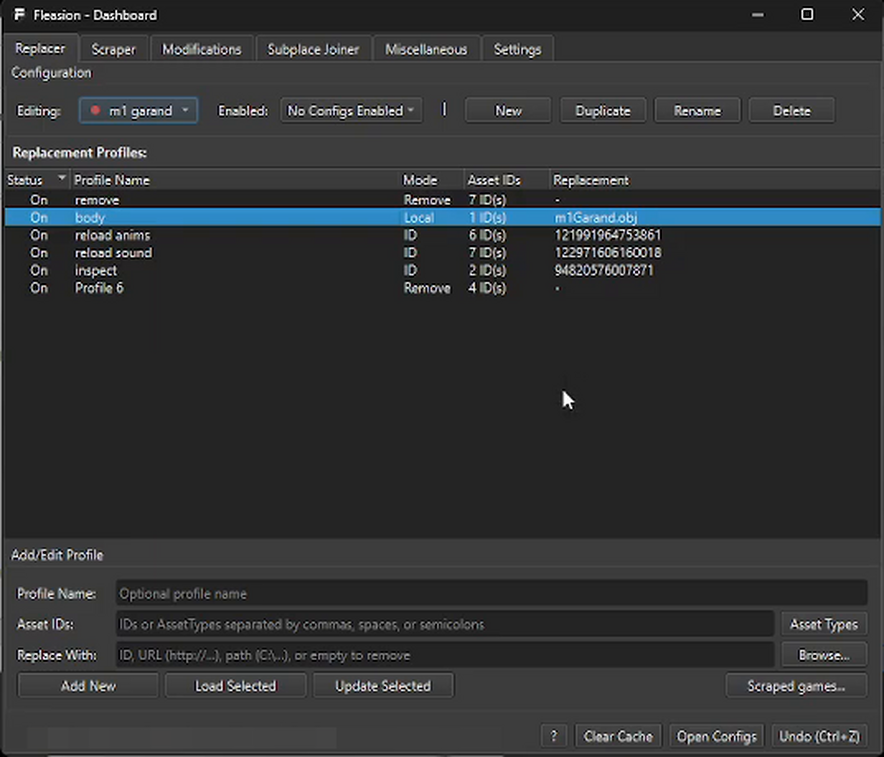
This is exactly what step 2 looks like in the dashboard: the model sits in a body profile set to Local mode — here it's m1Garand.obj for a custom M1 Garand. Select that row, hit Load Selected, Browse to your own copy of the file, then Update Selected.
The honest .obj caveat
We'll say it plainly because the creators of these tutorials do too: raw .obj models are heavier than Roblox's optimized meshes. They can spike lag and take longer to appear, especially on lower-end machines. For a clean, well-built model it's fine; for something dense, expect a performance cost. If frames matter more than a specific shape, that may not be the swap for you.
Finding asset IDs (and the private-upload catch)
The other half of "custom models/assets" is knowing which asset to target. Fleasion's Scraper pulls the asset IDs out of a game so you can see what's there and aim your swaps — handy for any game we don't ship a preset for.
When you go the other direction and want to use your own uploaded content, mind this catch: Roblox keeps most user uploads (especially audio) private, and a private asset ID won't load for you. That's why the reliable route for custom sounds is a local file rather than an ID — the same lesson from our custom hit sounds guide.
Frequently asked questions
How do I replace an .obj in Fleasion?
Import the model's JSON, find the entry ending in .obj in the Replacer (often under "body"), press Load selected, Browse to your own .obj, then Update selected. Clear the cache and open the game.
Why is my custom model laggy?
Raw .obj models are heavier than Roblox's optimized meshes, so they can lag and load slowly, especially on low-end PCs. Give it time to load, or use a lighter model.
Can Fleasion export a rigged Roblox mesh?
Yes. In v2.4.0 the cache exporter can detect an embedded rig and produce a single .glb containing geometry, skeleton and skin weights.
How do I find a game's asset IDs? Use Fleasion's Scraper — it pulls the asset IDs from a game so you can target them, even for games without a built-in preset.
Can I use my own uploaded Roblox asset ID? Sometimes — but Roblox keeps most uploads private, and private IDs won't load. For reliability, use a local file where you can (this matters most for audio).
Updated August 15, 2026 — added v2.4.0 rigged GLB export, mesh v6/v7 and Draco/LOD details.
Related: No arms / no textures · Custom hit sounds · Presets & configs · Glossary